What a JWT actually is
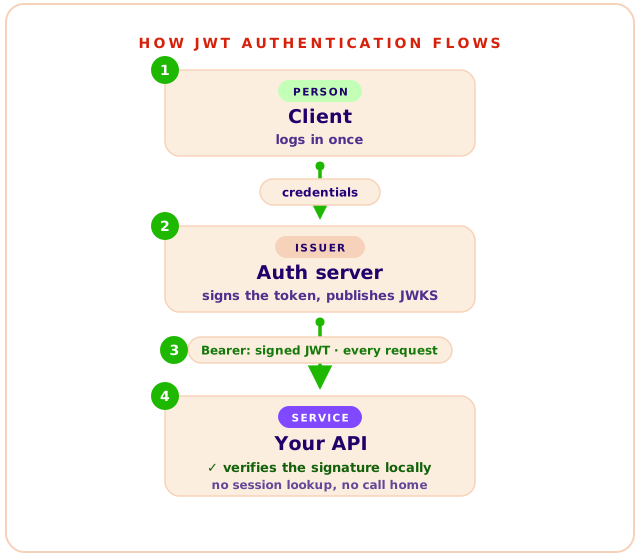
A JSON Web Token (JWT) is a signed, self-contained token with three base64url parts: header, payload, and signature. The server verifies the signature and trusts the claims inside without any session lookup, which makes JWTs stateless. That statelessness is their strength and their main operational risk: revoking a token early takes extra machinery.
A full login system has more layers than the token: how users prove who they are (passwords, passkeys, social login), how that proof turns into something the browser can hold, and how every later request gets checked. The token is the carrier for those last two jobs. Our SaaS authentication guide maps the whole stack; this page takes the token itself apart.
Every authenticated request raises the same questions: who is this user, are they still allowed in, what may they do? A token exists to answer them, and the answers it carries are called claims: small key-value facts about the user and about the token itself. Some claim names are standardized, like sub (which user this is) and exp (when the token stops being valid), and you can add your own. The point of packing the answers into the token is that nothing else needs to be asked: the signature breaks if anyone edits a claim, so a service can read them straight out of the request and trust them, with no database lookup and no call to anyone. That one property, verification without lookups, is what the rest of this page keeps coming back to.
Dissecting an example token
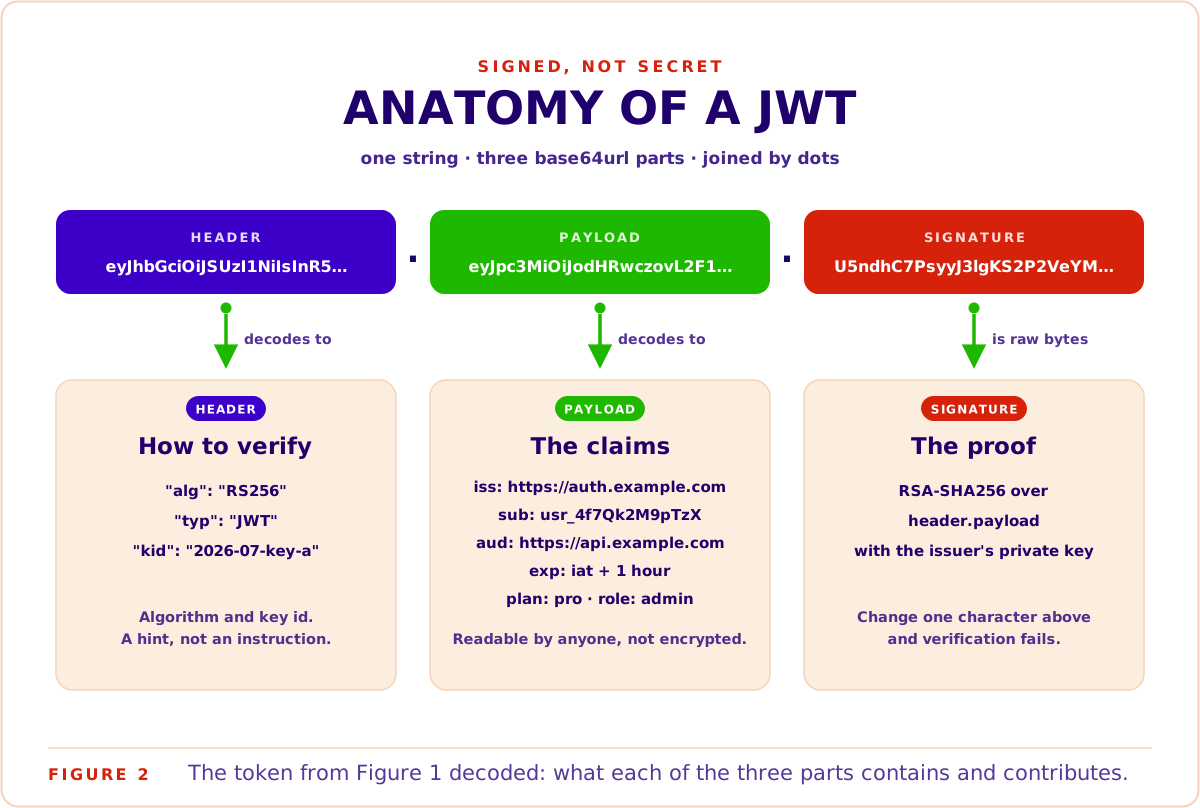
A JWT is three base64url strings joined by dots. The first string is the header, which names the signing algorithm and key id. The second is the payload, which carries the claims. The third is the signature, which covers the other two. Decoding needs no key at all; only verification needs cryptography. Here is a complete example token, taken apart piece by piece.
This token is mechanically real: correctly formed and RS256-signed. But it was signed with a throwaway key generated for this article, so it is an example, not a production credential. No live system trusts it.
eyJhbGciOiJSUzI1NiIsInR5cCI6IkpXVCIsImtpZCI6IjIwMjYtMDcta2V5LWEifQ
.eyJpc3MiOiJodHRwczovL2F1dGguZXhhbXBsZS5jb20iLCJzdWIiOiJ1c3JfNGY3UWsyTTlwVHpYIiwiYXVkIjoiaHR0cHM6Ly9hcGkuZXhhbXBsZS5jb20iLCJpYXQiOjE3ODUyMjU2MDAsImV4cCI6MTc4NTIyOTIwMCwicGxhbiI6InBybyIsInJvbGUiOiJhZG1pbiJ9
.U5ndhC7PsyyJ3lgKS2P2VeYMq9DGtP7ZAMYYRMx8ojwfbVOiLAmfkGBvpeJMESKlmh9Qh-Av2W_0Gbgiy9R6j_xx-yzT6qBwtU66zCRSSyJQmcw2IaJDMv778ksVM1yCt6BMSmRVSjJvQ3FutlzM2wzVq3J_MMQcwawsj6Vi41GHDKYZTs7PAyWWO3nRWqFWmMxEmh8Jzj8Bs7yYtQ83Owo3XzRsK7wTa1sckR7Xe_YiDZHxOnds5JmrFz-O06duSX9kmtPfTlGcyh3jeoTnhGTcJ-gRb0yL30bNCPu1Gc0L1KnUGBzB3el6TuP79n9XoXU6rqtG_Ey20IxJgmEAyw
Figure 1A complete JWT exactly as it travels in a request: one line of base64url text, shown wrapped here. The two dots split it into the three parts named above; each part is decoded below.
The header decodes to:
{ "alg": "RS256", "typ": "JWT", "kid": "2026-07-key-a" }It tells the verifier how to check the signature: the algorithm (RS256) and which key was used (kid, the key id, used to pick the right public key from a key set). Treat the header as a hint from an untrusted source, not an instruction. Your verifier should already know which algorithms it accepts.
The payload decodes to:
{
  "iss": "https://auth.example.com",
  "sub": "usr_4f7Qk2M9pTzX",
  "aud": "https://api.example.com",
  "iat": 1785225600,
  "exp": 1785229200,
  "plan": "pro",
  "role": "admin"
}
The first five are registered claims, defined by RFC 7519 itself: iss (who issued it), sub (who it is about), aud (who may accept it), iat (when it was issued), and exp (when it dies). Strictly speaking the spec makes every claim optional: no field is mandatory for a token to be a valid JWT. In practice your verifier sets the law, and production verifiers reject tokens missing exp, iss, or aud.
The last two, plan and role, are private claims: keys you invent, carrying anything your application wants the token to state, as long as the names do not collide with registered ones. This is what makes the format flexible. The token is a small signed document, and you get to design its schema.
A naming aside worth thirty seconds: what everyone calls a JWT is almost always a JWS, a JSON Web Signature. The JWT spec defines the claims format you just read; the JWS wrapper supplies the signature that makes it trustworthy. Unsigned tokens exist in the spec but have no place in production, so in practice JWT means "signed JSON claims".
The signature is what makes the two JSON parts above tamper proof. It is not JSON itself and does not decode to anything readable, because it is raw cryptographic output. It is produced by hashing header.payload and signing that hash with the issuer's private key. Verification reruns the same math from the other side: the verifier hashes the header.payload it actually received, then uses the public key to confirm the signature matches that hash. Change one character anywhere in the first two parts and the recomputed hash no longer matches the signed one, so verification fails. That is the whole tamper-proofing mechanism: nothing is hidden, but only the private key could have produced a signature that checks out.
Two cautions before you play with this yourself. First, base64url is encoding, not encryption: anyone who holds a token can read everything in it, which is why secrets never belong in a payload. Second, the jwt.io debugger is a genuinely useful tool for inspecting tokens, but paste example tokens only. A production token is a live credential, and pasting credentials into websites is how credentials leak. If you want to poke at a token safely, our own client-side JWT decoder never transmits it at all: decoding runs entirely in your browser.
How JWT authentication works end to end
JWT authentication has four moves: the user logs in, the auth server issues a signed token, the client attaches it to every request as a Bearer header, and each service verifies the signature with the issuer's public key. No server keeps a session record. The token is the session.
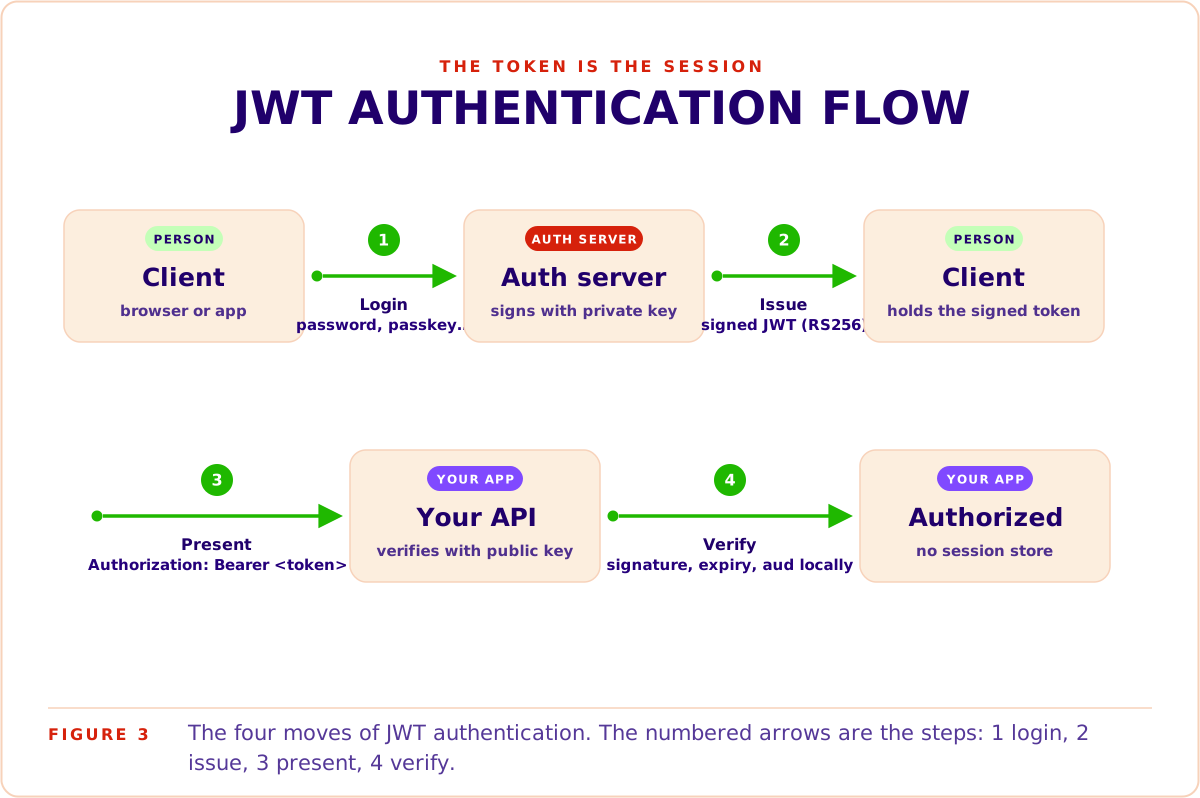
Step by step, following the numbered arrows in Figure 3:
- Login. The client proves identity once, with a password, a passkey, a magic link, or a social login.
- Issue. The auth server builds the claims, signs them with its private key, and hands the token back.
- Present. The client sends the token on every API call in the HTTP Authorization header:
Authorization: Bearer <token>. The Bearer scheme comes from OAuth 2.0 (RFC 6750), and the name is literal: whoever bears the token gets access. - Verify. The API checks the signature against the issuer's public key, checks the expiry and audience, and authorizes the request. No database round trip, no shared session store.
The verification step is the entire appeal. Verification is local math, so any number of services can authenticate the same request independently. Your API gateway checks the token, your billing service checks the same token, your reporting service checks it again, and none of them talk to each other or to a session store to do it. One login, one token, any number of verifiers.
The word "Bearer" also names the threat model. Possession is proof, so anyone who steals the token is the user until it expires. Transport security and storage discipline are not optional extras; they are the other half of the design.
JWT vs sessions: what stateless actually costs
Sessions came first and still run large parts of the web, so the honest question is why JWTs took over so much of the new work. The short answer: the way we build apps changed. One backend became many services, server-rendered pages became SPAs and mobile clients, and a session row in one server's database stopped being reachable from everywhere a request lands. JWTs made the session portable. The state moved into the token, and any service holding a public key can check it alone. That is the preference in one line; the rest of this section prices it honestly.
Session authentication stores state on the server and pays a database lookup on every request. JWT authentication moves the state into the token and pays a signature check instead. You gain horizontal scale and lose instant revocation: a signed token stays valid until it expires, wherever it travels.
| Classic sessions | JWT | |
|---|---|---|
| Where the state lives | Server-side session store | Inside the token |
| Cost per request | A session-store lookup | A local signature check |
| Revocation | Instant: delete the row | At expiry, unless you add a denylist |
| Scaling to many services | Every service needs the shared store | Every service verifies independently |
| Frontend-only clients | Need a backend to hold the session | Work against any API that holds the public key |
| Best fit | One backend, instant-logout requirements | Many services, horizontal scale |
With classic sessions, the browser holds a random session id in a cookie and the server holds everything else. Revocation is trivial: delete the row, the user is out. The cost is that every service handling a request needs access to that session store, which turns into a shared bottleneck the moment you run more than one backend. It also presumes there is a backend: a frontend-only app calling APIs directly has nowhere to keep a server-side session, which is a big part of why token auth became the default for SPAs and mobile apps.
JWTs invert the trade. Verification needs only the public key, so twenty services can each check tokens without talking to each other or to a central store. This is the scalability win, and it is hard to overstate: adding your twenty-first service adds zero load on your auth infrastructure, because verification never leaves the service doing it. That is why JWTs dominate authentication in microservices: the alternative is every internal service calling home on every request.
Now the honest part. You cannot un-sign a token. If an account is compromised or an employee walks out the door, their access token works until exp. The standard mitigations:
- Short access-token lifetimes. Minutes, not days. The token in Figure 1 lives one hour; plenty of systems use fifteen minutes.
- Refresh-token rotation. Real revocation happens at the auth server when the client comes back for a new access token. Kill the refresh token and the session dies at the next renewal.
- A denylist for the emergencies. For logout-everywhere and incident response, a small cache of revoked token ids (
jticlaims) checked at the gateway restores instant revocation for the rare cases that need it.
If your system genuinely needs instant, universal revocation on every request, opaque tokens with introspection are the right tool, and pretending otherwise causes pain. More on those below. (And if you would rather not build revocation plumbing at all, that is one of the trade-offs a managed layer absorbs; see the product section at the end.)
Keys, JWKS, and rotation
With RS256 the auth server signs tokens with a private key and publishes the matching public keys as a JSON Web Key Set (JWKS): a plain JSON document listing the issuer's current public keys. Your API is the consumer. Its JWT library fetches the JWKS once, caches it, and picks the right key by the token's kid header every time it verifies a request. That one document is what makes key rotation safe and routine.
The algorithm choice matters more than most tutorials admit. HS256 is symmetric: one shared secret both signs and verifies, so every service that can check a token can also mint one. RS256 (and its elliptic-curve sibling ES256) is asymmetric: the private key signs, the public key verifies, and the public key can be published freely. The moment more than one service verifies your tokens, asymmetric signing is the correct default, which is why every example on this page uses RS256.
Publishing is less ceremony than the word suggests: the issuer simply serves the JWKS (RFC 7517) as a JSON document at a well-known URL, and anyone may read it, because public keys are meant to be public. Here is a realistically shaped example for our example issuer, living at https://auth.example.com/.well-known/jwks.json:
{
  "keys": [
    {
      "kty": "RSA",
      "kid": "2026-07-key-a",
      "use": "sig",
      "alg": "RS256",
      "n": "qO-yhdCDct4rcxV7gqvsHv7NXNvhGtINeYl6cjxO3_CL...",
      "e": "AQAB"
    },
    {
      "kty": "RSA",
      "kid": "2026-01-key-x",
      "use": "sig",
      "alg": "RS256",
      "n": "3f1dYm9pW2kQx8Rt0uVzLc5nHb7Jd2sKfTqGe4wPjZ0M...",
      "e": "AQAB"
    }
  ]
}
Figure 4A JWKS with two active keys, as served at the issuer's well-known URL.
Reading one entry: kty names the key family (RSA), use: "sig" marks it as a signing key, alg pins its algorithm, and n and e are the actual public key, the RSA modulus and exponent. The n values are truncated here with an ellipsis; a real 2048-bit modulus runs to roughly 340 base64url characters. Each key carries its kid, and a verifier matches the token header's kid against the set.
Can an attacker fake this? Not usefully. The keys are public by design, and knowing them does not help forge signatures; only the private key can sign. What an attacker would need is to make your verifier fetch a key set they control, which is why the JWKS URL is configured on your side, fetched over HTTPS, and never taken from the token itself.
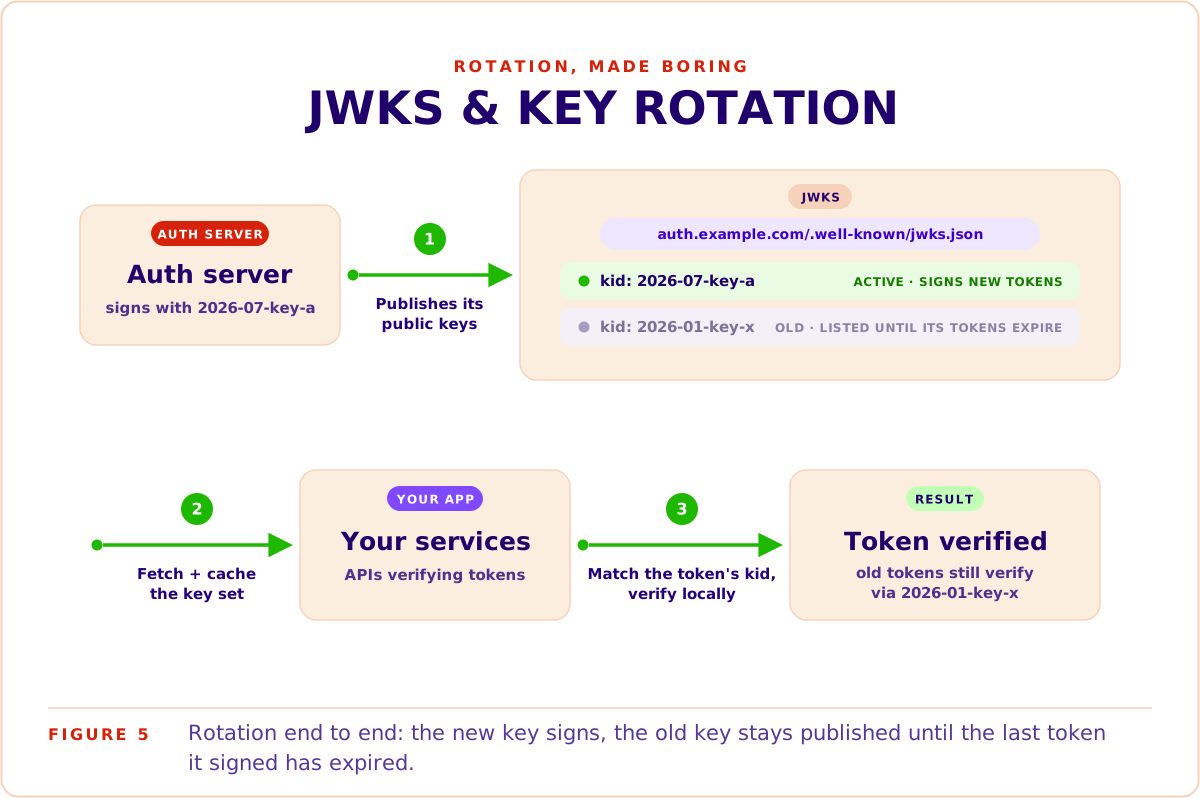
The key set in Figure 4 deliberately holds two keys, and that is rotation in action. The issuer has started signing with 2026-07-key-a while 2026-01-key-x stays published, so tokens signed before the switch still verify. Once every old token has expired, the old key disappears from the set. Verifiers never notice; they just keep matching by kid. Figure 5 shows the flow end to end:
One attack class deserves its own paragraph, because most JWT guides skip it: algorithm confusion. The token header claims which algorithm was used, and the header is attacker-controlled. Two classic exploits follow. The first is alg: "none": some early libraries accepted such tokens as validly "signed" with no signature at all. The second is the RS256-to-HS256 downgrade: the attacker forges a token, sets its header to HS256, and signs it with an HMAC whose secret is your public RSA key. A naive verifier that obeys the header then checks the HMAC using the public key it already holds, and the forgery passes. The defense against both is the same line of code: configure your verifier with an explicit algorithm allowlist and never let the token pick.
The other tokens you'll meet
Not every credential is a JWT. Opaque tokens are random strings the issuer resolves, refresh tokens mint new access tokens, API keys identify machines, personal access tokens delegate a user's rights to scripts, and DPoP binds a token to a client key. Each entry below says what the thing is and when your app would actually reach for it.
- Refresh tokens. These answer a question the short lifetimes above create: if access tokens die in fifteen minutes, why isn't the user logged out every fifteen minutes? Because the client also holds a long-lived refresh token, used only against the auth server, and silently trades it for a fresh access token whenever the current one expires. The user stays signed in for days; a stolen access token stays useful for minutes. Refresh tokens are usually opaque precisely so the auth server can revoke them, and modern practice rotates them on every use, so a stolen one is detected the next time anyone tries to refresh with it. If you use short-lived JWTs, you will use refresh tokens; they are two halves of one design.
- Opaque tokens. A random string with no internal structure; the issuer keeps the meaning in a database, so checking one means asking the issuer. That lookup buys instant revocation. Reach for them when kill-it-now matters more than distributed verification: admin sessions, high-risk actions, or any single-backend app where the lookup is cheap anyway. Plenty of session cookies and OAuth access tokens are opaque, and that is a legitimate design, not a lesser one.
- API keys. They identify an application or machine, not a person, for server-to-server calls where nobody is present to log in. No standard structure, no built-in expiry, so treat them like passwords: scope them narrowly, store them in secret managers, rotate them on a schedule.
- Personal access tokens (PATs). A user-scoped key for scripts and CI, GitHub-style: use one when automation should act as you, with a subset of your rights and an expiry date, instead of a shared anonymous key. Operationally an API key that maps to a human.
- DPoP and sender-constrained tokens. RFC 9449 (2023) binds a token to a client-held key, so presenting the token also requires proving possession of that key. It converts "whoever bears it" into "whoever bears it and holds the key", which defuses plain token theft. Consider it once stolen-token replay is a real part of your threat model and your client platforms can manage keys.
One line on a related standard you will eventually meet: OAuth 2.0 Token Exchange (RFC 8693) defines how to swap one token for another, for example when a service needs a narrower token to call a downstream service on the user's behalf.
Best practices that actually matter
Most JWT incidents are not broken cryptography. They are skipped verification steps: tokens decoded but never verified, algorithms read from attacker input, missing audience checks, secrets in a readable payload. These nine practices cover the failures that actually happen in production, roughly in the order they bite.
- HTTPS everywhere, including the JWKS endpoint. The first question every developer asks about bearer tokens is the right one: what stops someone on the network from reading mine? Only the transport. A bearer token over plain HTTP is a credential broadcast, and a JWKS fetched over an insecure channel means an attacker can hand your verifier their own keys. TLS is not a deployment detail here; it is the other half of the security model.
- Verify, don't decode. The classic implementation mistake: most libraries ship a
decode()that skips signature checks, meant for debugging. Every year, production systems ship with it on the hot path. If the function name does not say verify, it does not authenticate anything. - Pin your algorithms. Configure the verifier with an explicit allowlist (
RS256here) and reject everything else, includingnone. This single line closes the whole algorithm-confusion class described above. - Validate
issandaud, always. The signature proves who wrote the token, not that it was meant for you. Without an audience check, a token issued for one service replays perfectly against another that trusts the same issuer. - Keep secrets out of the payload. Anyone holding the token reads everything in it. If you genuinely must transport sensitive data inside a token, JWE (RFC 7516) exists, but the better answer is usually to not put it there.
- Store tokens deliberately. In browsers: an httpOnly, Secure, SameSite cookie or in-memory storage. localStorage survives XSS long enough to be exfiltrated, and long-lived tokens there are the classic breach shape.
- Expire short, refresh properly. Access tokens in minutes, renewal via rotating refresh tokens. Expiry is your only universal revocation mechanism, so the window it defines should be one you can live with during an incident.
- Rotate keys on a schedule. With JWKS the process is boring, which is the point: add the new key, sign with it, retire the old key after the last token it signed expires. Practice it before an emergency makes you.
- Watch token size. Tokens ride on every request, headers are commonly capped near 8 KB, and cookies near 4 KB. A permissions array with hundreds of entries belongs in your authorization layer, not in the token.
For the exhaustive version of this list, OWASP's JWT cheat sheet is the reference worth bookmarking.
Libraries in 2026: jose first
Use jose. It is actively maintained, has zero dependencies, runs on Node, browsers, Deno, Bun, and edge runtimes, and verifying against a remote JWKS takes three lines. Pin the current major, jose v6. jsonwebtoken still works in older codebases, but its last release shipped in 2023.
Here is the verification path most services need, in full:
import { createRemoteJWKSet, jwtVerify } from 'jose'; // pin: jose v6

const JWKS = createRemoteJWKSet(
  new URL('https://auth.example.com/.well-known/jwks.json')
);

const { payload } = await jwtVerify(token, JWKS, {
  issuer: 'https://auth.example.com',
  audience: 'https://api.example.com',
  algorithms: ['RS256']
});
Those three options are practices 3 and 4 from the list above, enforced in configuration. createRemoteJWKSet handles fetching, caching, and kid selection, including picking up a newly rotated key without a deploy.
On jsonwebtoken, the honest status: it carried the Node ecosystem for a decade, its v9 line shipped in December 2022, and its most recent release dates to 2023. It verifies HS256 and RS256 fine, but JWKS support requires the companion jwks-rsa package, and edge runtimes were never its target. Existing code using it is not broken; new code has a better default. One closing thought on where this all goes. Everything above hardens bearer tokens, but the sharpest edge remains the word bearer: possession is proof. The industry's answer is arriving from two directions at once, sender-constrained tokens like DPoP on the API side, and phishing-resistant login on the user side. If you want to remove the password half of that equation today, start with our guide to implementing passkeys.