
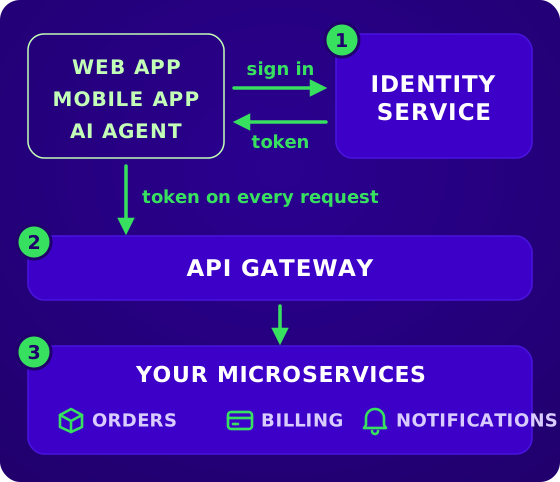
In a single application, login is simple: the user signs in once, and every request the app handles can ask the same session who the user is. Split that application into microservices, and each service now receives its own requests while still needing to know who sent them. The usual solution is a central identity service that signs users in and issues a signed token every service can check on its own, and this guide walks through that setup, from the first token to the calls your services make to each other.
How authentication works in microservices
Authentication in microservices is built from three parts, and most systems use all of them:
- An identity service signs users in and hands out tokens. It is the only part that ever sees a password.
- An API gateway receives every request from outside and can turn away requests without a valid token.
- Your microservices do the actual work, and each one can check the token itself before it does.
They aren't three alternatives to choose from. The identity service is always there, because the other two check the tokens it signs. The gateway and the services are two places to run that check, and you can use either or both.
Here are the four steps in the identity flow, as Figure 1 shows:
- The user signs in at the identity service, with a password, a passkey, a magic link or a social login.
- The identity service returns a signed token to the app.
- The app sends the token with every request, in the
Authorization: Bearer <token>header, and the API gateway checks it. - The gateway passes the request on to the service that handles it. The service reads who the user is from the token, and can check the token again itself.
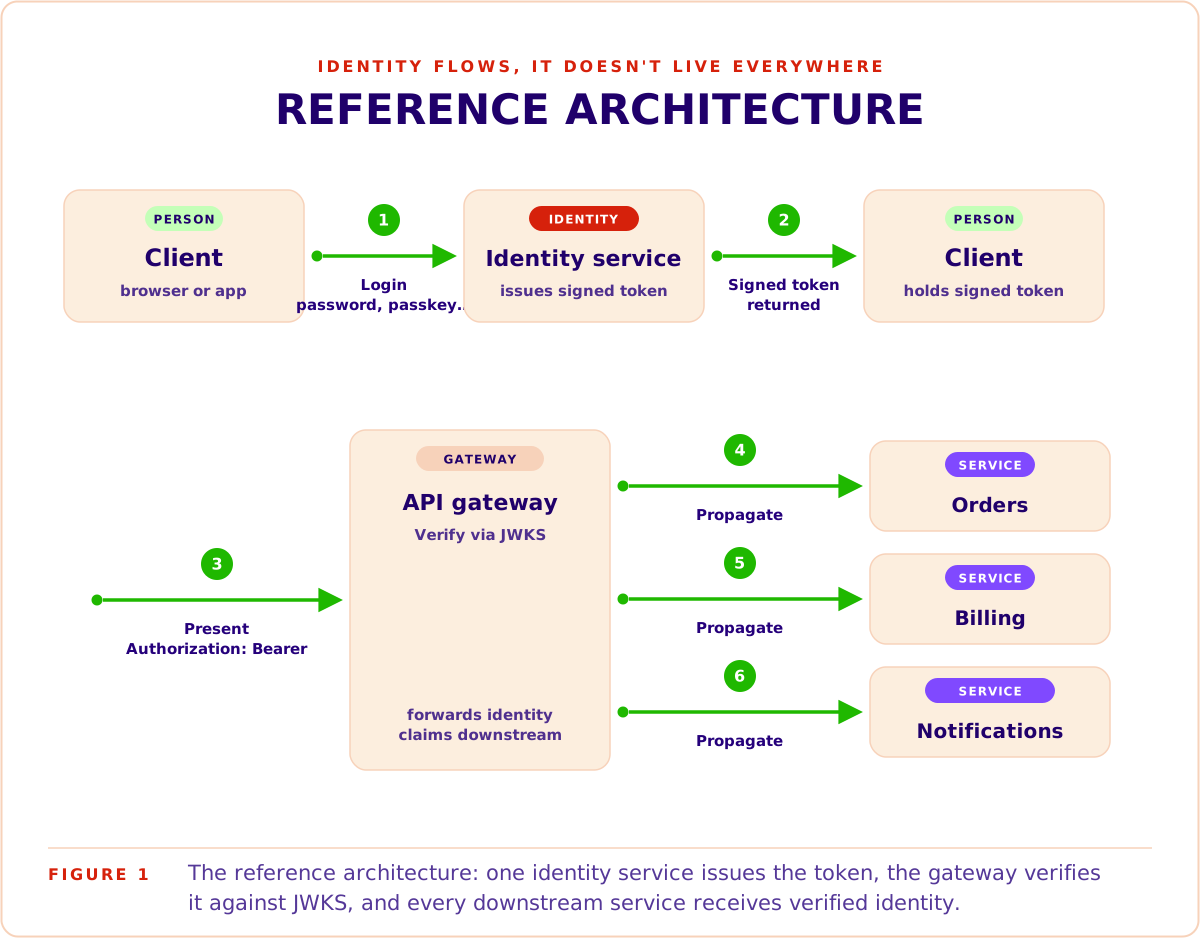
After step 2, the identity service isn't involved any more. The gateway and the services check the token on their own, so the identity service doesn't slow down every request.
What the token carries
The token is usually a JSON Web Token (JWT): a small piece of JSON with facts about the user, called claims, and a signature from the identity service. Figure 2 shows the claims in the token of Ana, an admin in the Acme organisation.
{
  "iss": "https://auth.example.com",
  "sub": "usr_4f7Qk2M9",
  "aud": "https://api.example.com",
  "org": "org_acme",
  "role": "admin",
  "privileges": ["orders:write", "billing:refund"],
  "exp": 1790612400
}
Figure 2The claims in Ana's token. iss names the identity service that signed it, sub is Ana's user id, aud names the API the token is meant for, org and role say which organisation she is working in and her role there, privileges lists what that role may do, and exp is when the token expires.
To check a token, a service needs the identity service's public keys. The identity service publishes them at a fixed address, a JSON Web Key Set (JWKS) endpoint, such as The Bridge's at https://api.thebridge.dev/auth/.well-known/jwks.json, and each service downloads them once and keeps them in memory. The check itself then needs no network call:
- The signature matches one of the identity service's keys, so nobody has changed the token.
- The issuer (
iss) is your identity service. - The audience (
aud) is your API, so a token made for another app is refused. - The expiry (
exp) hasn't passed. Access tokens usually live for minutes up to an hour, and then the app gets a new one.
If JWTs are new to you, how JWT authentication works covers them in depth. For a longer independent treatment of the whole topic, Chris Richardson's series on authentication and authorization in a microservice architecture starts with Part 1, an introduction, and goes further into authorization than this guide does.
The three building blocks of microservices authentication
This section goes through the three parts one at a time, starting with the identity service, because the other two check the tokens it signs.
The identity service signs users in and issues tokens
Login pages, password reset, multi-factor authentication (MFA), social login and organisation invitations all live in the identity service, together with the user accounts themselves. Every other service trusts the tokens it signs. Figure 3 shows three different applications all getting the same user object from a central identity service.
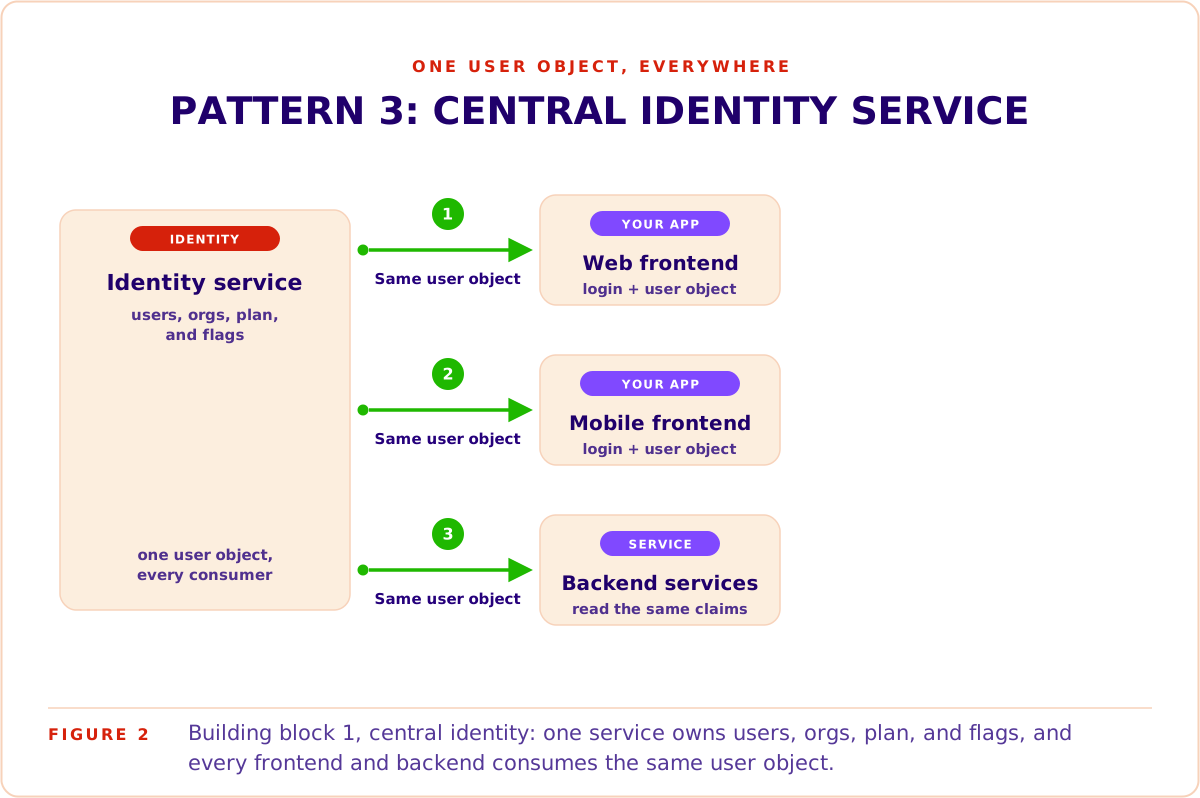
Putting all of this in one service means you build it once. If your web app and your mobile app each had their own login, you would build sign-up, password reset and MFA twice, keep passwords in two databases, and watch the two login flows drift apart. With one identity service, your other services hold no passwords at all.
The identity service is only called when a user signs in or the app renews a token. Every other request is checked with the public keys the services already have, so the identity service stays out of the way of your normal traffic.
Most identity services are built on OAuth 2.0 and OpenID Connect (OIDC), the standards for issuing tokens and describing the user in them. Because they are standards, your gateway, your services' JWT libraries and the identity service work together without custom glue.
Its weak spot is that it holds every user's credentials, and sign-in and token renewal stop when it is down. Run it highly available, and guard it more closely than anything else in your system.
You can self-host the identity service with an open-source solution such as Keycloak or a service you have written yourself, or use a managed platform.
The API gateway checks tokens at the edge
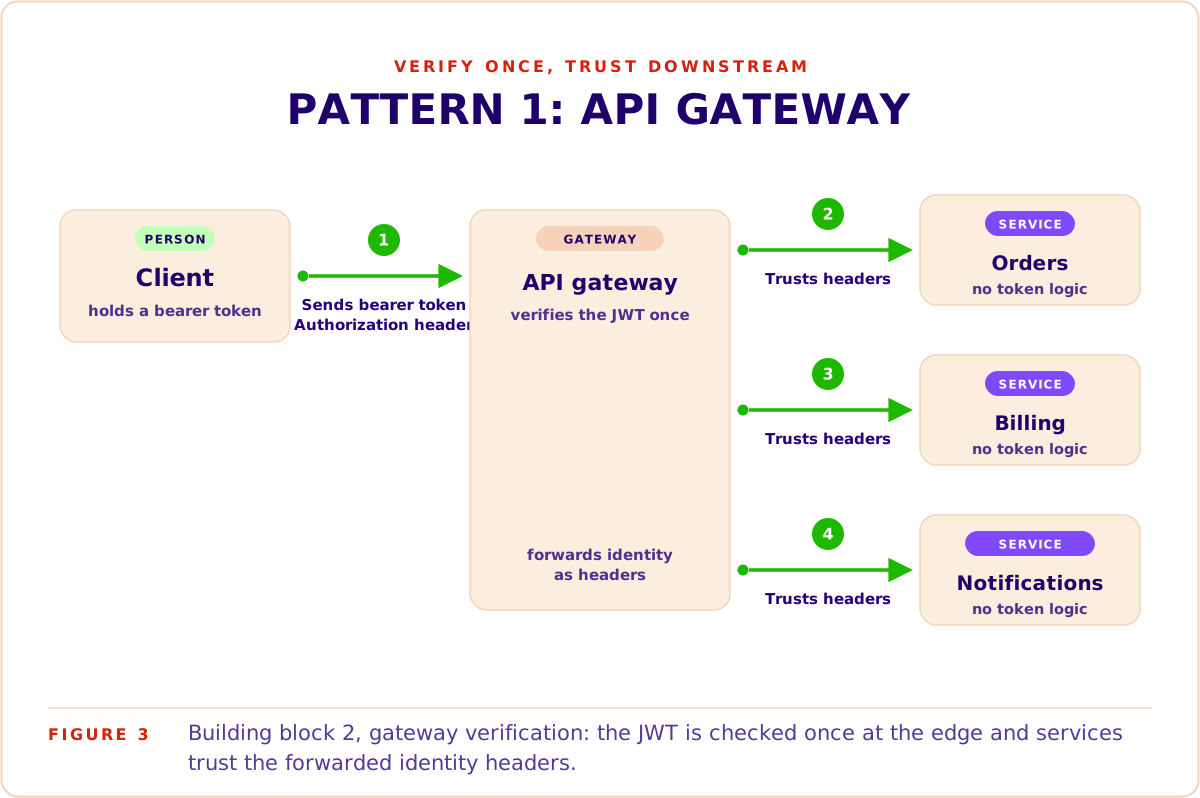
An API gateway is the single entry point for requests from outside. It isn't a must-have, and you can live without one, but it is common practice to run one for routing, TLS and rate limiting. It can check tokens too: it turns away requests with a missing or invalid token, and passes the valid ones on with the user's identity attached, as Figure 4 shows.
Most gateways can check JWTs with configuration rather than code:
- Spring Cloud Gateway on the JVM, checking through Spring Security's OAuth2 resource server, in both reactive (WebFlux) and servlet (MVC) variants.
- Envoy has a dedicated
jwt_authnfilter, and the Kubernetes-native Envoy Gateway project offers the same check declaratively. - Kong checks JWTs too, with one catch: its open-source jwt plugin expects each signing key to be registered by hand, while fetching keys from a JWKS endpoint needs the enterprise OpenID Connect plugin.
- The managed clouds: AWS API Gateway's JWT authorizers (HTTP APIs natively; REST APIs natively only for Cognito, otherwise through a Lambda authorizer), Azure API Management's validate-jwt policy, and Google Cloud's API Gateway with
x-google-jwks_uriin the OpenAPI spec.
The weak spot is what happens behind the gateway. Services that rely on it accept any request that reaches them, so one compromised service inside your network can call the others as any user it likes. The gateway also has to run highly available, because when it is down, nothing gets in.
Your microservices check tokens themselves
Here each service checks the token on every request, with the identity service's public keys cached in memory. Figure 5 shows the check as Express middleware with the jose library.
import { createRemoteJWKSet, jwtVerify } from 'jose'; // jose v6

// Downloads the identity service's public keys once and caches them.
const JWKS = createRemoteJWKSet(
  new URL('https://auth.example.com/.well-known/jwks.json')
);

export async function authenticate(req, res, next) {
  const token = (req.headers.authorization ?? '').replace(/^Bearer /i, '');
  try {
    const { payload } = await jwtVerify(token, JWKS, {
      issuer: 'https://auth.example.com',
      audience: 'https://api.example.com',
      algorithms: ['RS256'],
      clockTolerance: '5s' // server clocks differ by a few seconds
    });
    req.user = payload; // sub, org and role, for the code behind it
    next();
  } catch {
    res.status(401).end();
  }
}
Figure 5Token-checking middleware with jose. The issuer, audience and allowed algorithm are set explicitly, and the checked claims are passed on as req.user.
Every language has a mature library for the same check: jose on Node.js and edge runtimes, PyJWT in Python, Nimbus JOSE + JWT on the JVM. Figure 6 shows every service running it.
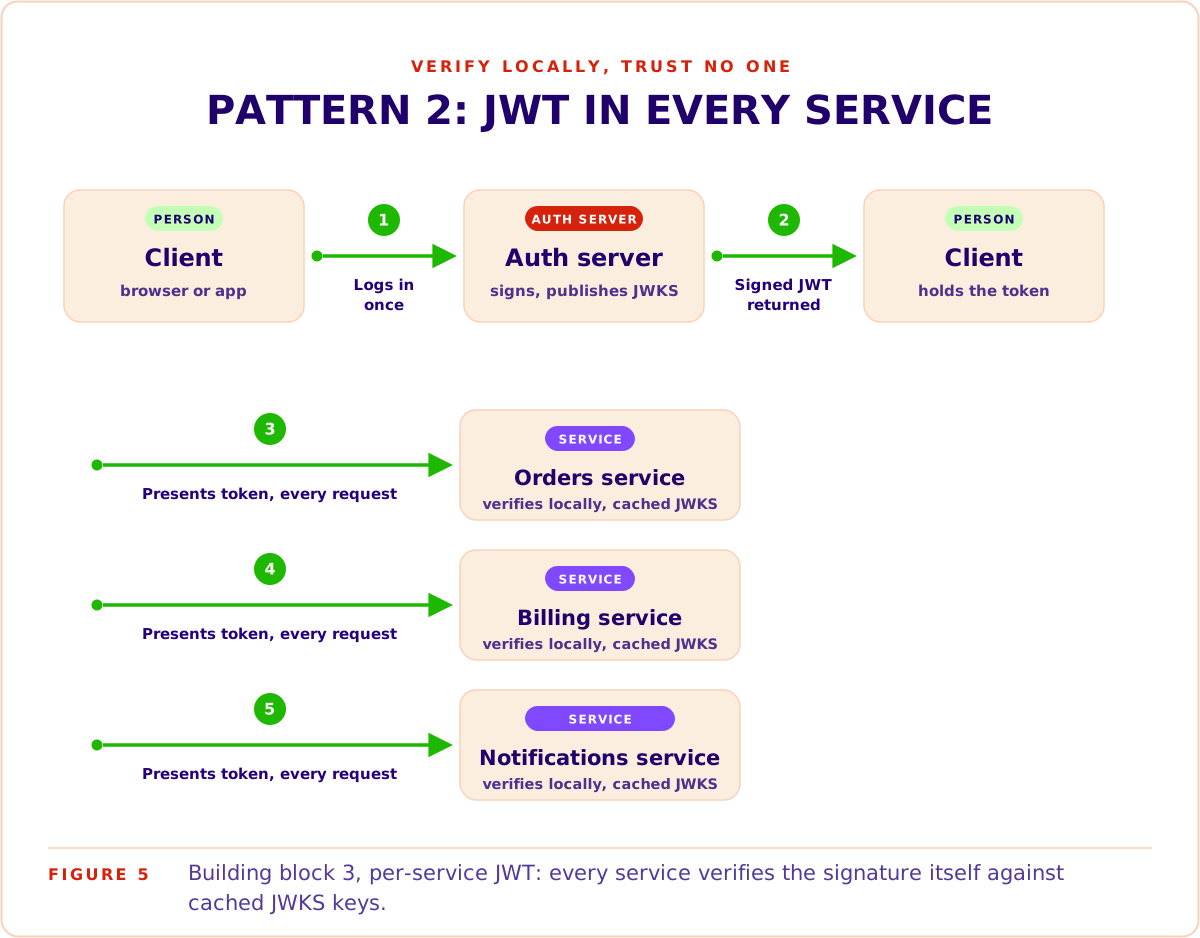
What you get:
- No request is trusted for coming from inside your network. A forged request from inside fails the same check as one from outside.
- Services keep working when the identity service is briefly down, as long as they have its keys cached. Users can't sign in or renew their tokens until it is back.
The weak spot is that every service now runs the check, so every service can get it wrong:
- Revocation waits for expiry. A token stays valid until its
exp, even if you lock the account a minute after it was issued. The black belt practice below covers the fixes. - Key rotation can break everything at once. When the identity service moves to a new signing key, every service must pick it up. JWKS caching handles this, as long as each service fetches the keys again when it meets one it doesn't know.
- Settings drift. A service that forgets to check the audience accepts tokens made for another API.
- Clocks disagree. Server clocks differ by a few seconds, so allow a small tolerance or tokens are refused a few seconds early.
Where authorization fits
Authentication tells a service who is calling. Authorization decides what that caller is allowed to do, and in a microservice system it matters just as much: each API endpoint controls a feature, and not every user may call every endpoint.
The usual way to model it is role-based access control (RBAC). Each user holds a role in their organisation, and each role holds a set of privileges, such as orders:write or billing:refund. The identity service puts the role and its privileges in the token, as in Figure 2, so every microservice knows them without asking anyone.
Each microservice then decides for its own endpoints:
- Each endpoint names the privilege it needs. In Billing,
POST /refundsneedsbilling:refund. - The service compares it with the token. With the privilege, the request runs. Without it, the service answers 403.
- Rules that depend on the data stay in the service that owns it. Whether a refund may be larger than the order is a billing rule, so Billing checks it.
Say Ana, an admin in Acme, asks for a refund. Her token carries billing:refund, so Billing lets it through, while the same request from a user without that privilege gets a 403. Our RBAC implementation guide shows how to design roles and privileges and check them in a backend.
Service-to-service authentication
So far every request has come from outside, through the gateway. Many requests don't stop at the first service. Say Ana cancels an order. The request reaches the Orders service, which then calls the Billing service to refund the payment. That second call happens inside your network and never passes the gateway, as Figure 7 shows.
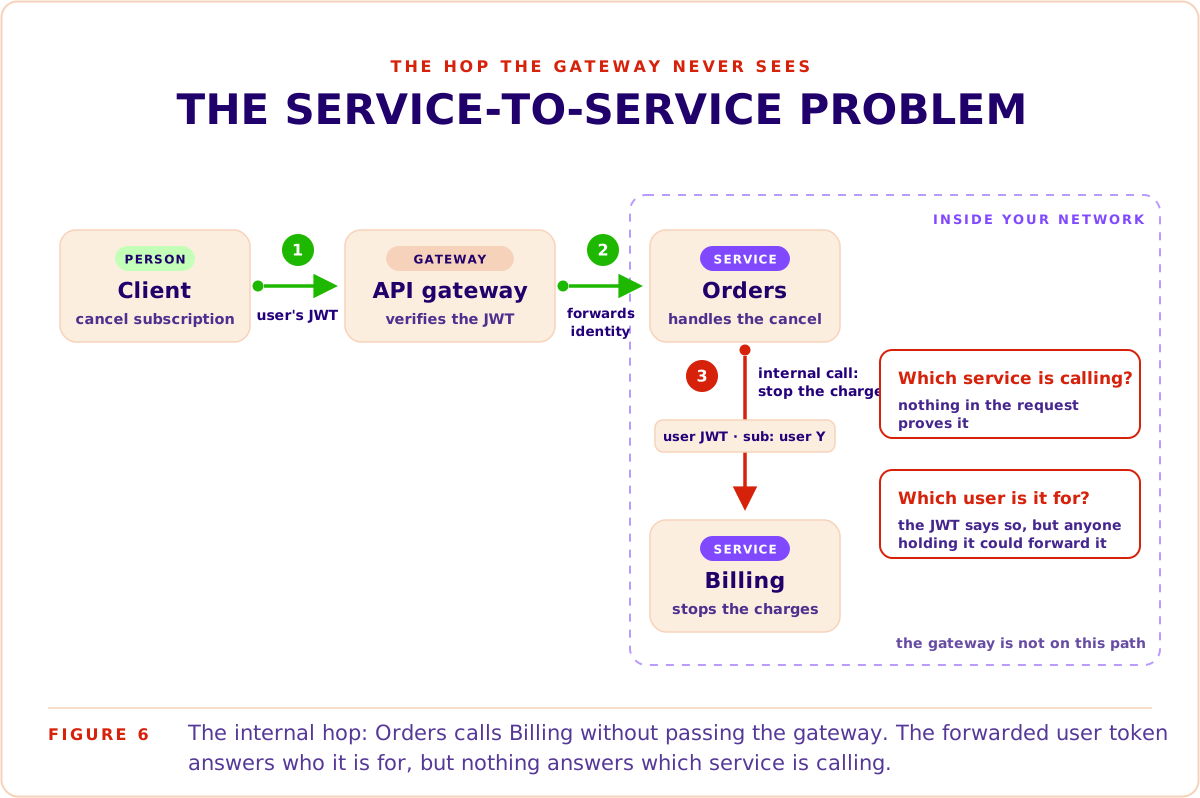
Billing now has two questions to answer:
- Which user is this for? Billing needs to know it is refunding a payment for Ana, in Acme.
- Which service is calling? Orders may be allowed to refund payments, while another service, for example a Notifications service that sends emails, should not be.
Many teams start by answering only the first question and treating anything inside the network as one of their own services. That works while the network is small and locked down, but one compromised service can then call anything, as the gateway section showed. The approaches below close that gap step by step.
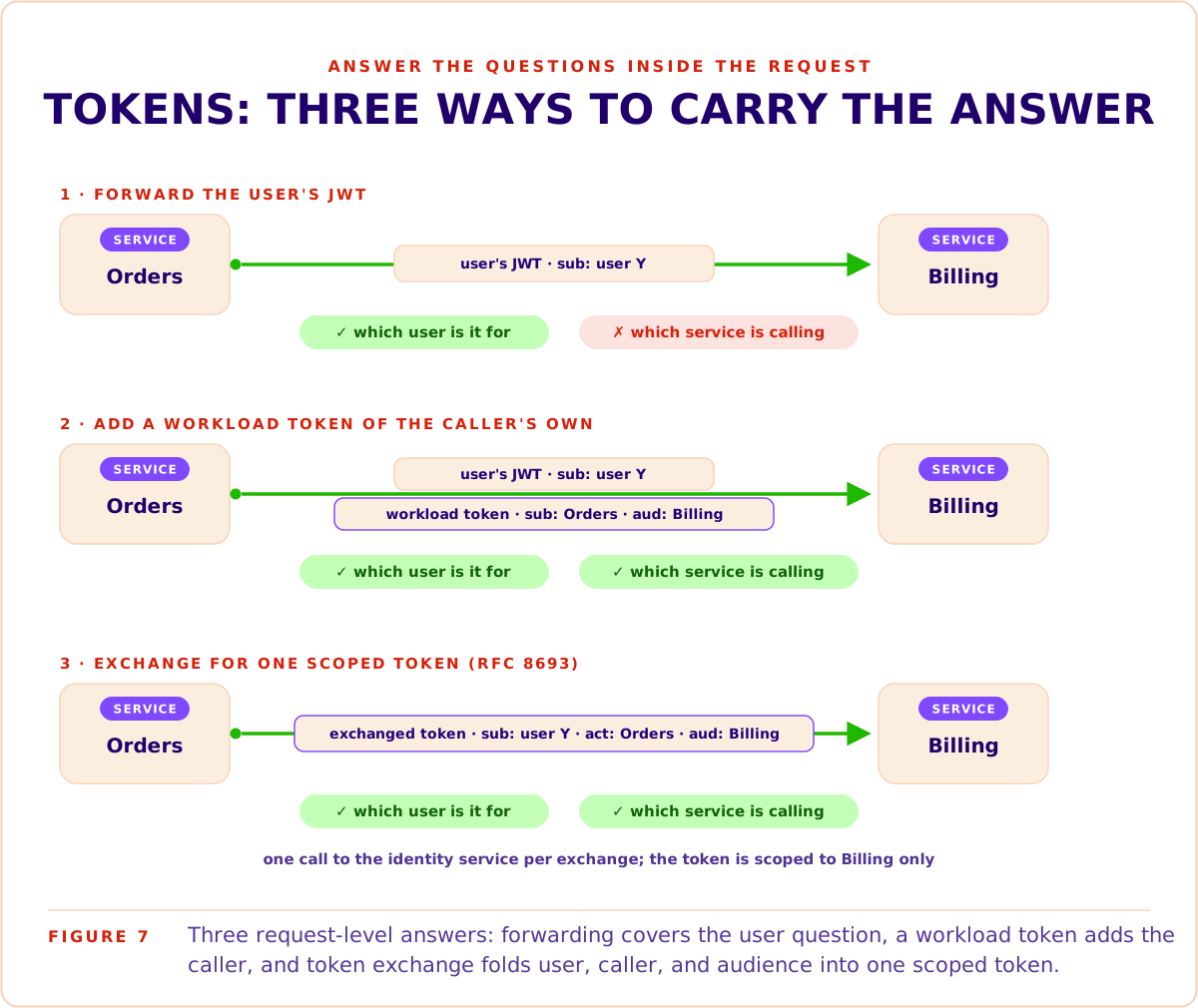
Forward the user's token
The simplest approach is for Orders to pass Ana's token along when it calls Billing. Billing checks it like any other token and knows the call is for Ana. For this to work, Billing must accept tokens whose audience is your public API.
What Billing can't tell is which service sent the token. And the token grants everything Ana's original request did, so a compromised service could replay it to any other service that accepts it.
Give each service a token of its own
To answer the second question, Orders sends a second token, about itself: a workload token whose sub names Orders and whose aud names Billing. Billing checks it the same way it checks users, and keeps a list of which services may call which of its endpoints. Your platform often creates these tokens for you:
- Google Cloud Run: a service fetches an identity token for its target from the metadata server, and IAM decides who may call whom.
- Kubernetes: pods can request short-lived service account tokens for a target audience, which services check against the cluster's published keys or through the Kubernetes API server.
- AWS: internal calls are usually signed with the calling service's IAM role (SigV4) instead of carrying a JWT, and AWS checks the signature, for example in API Gateway with IAM authorization or in VPC Lattice.
Without a platform to do it, use the OAuth client credentials grant: the identity service gives each service its own credentials, and each service fetches tokens in its own name.
Exchange the token at sensitive boundaries
OAuth 2.0 Token Exchange (RFC 8693) puts both answers in one token. Orders sends Ana's token to the identity service, proves it is Orders with its own credentials, and gets back a new, narrower one: meant only for Billing, with Ana as the user (sub) and Orders as the service acting for her (act).
Each exchange is a call to the identity service, so use it where it matters most, such as payments and admin actions. Figure 8 compares the three approaches.
When you need mutual TLS
Everything above checks each request. Mutual TLS (mTLS) checks the connection itself: both services show a certificate before any data flows, and the traffic between them is encrypted.
Managing those certificates by hand is hard work, so mTLS usually comes with a service mesh such as Istio or Linkerd. The mesh issues and renews certificates for your services without code changes, as Figure 9 shows.
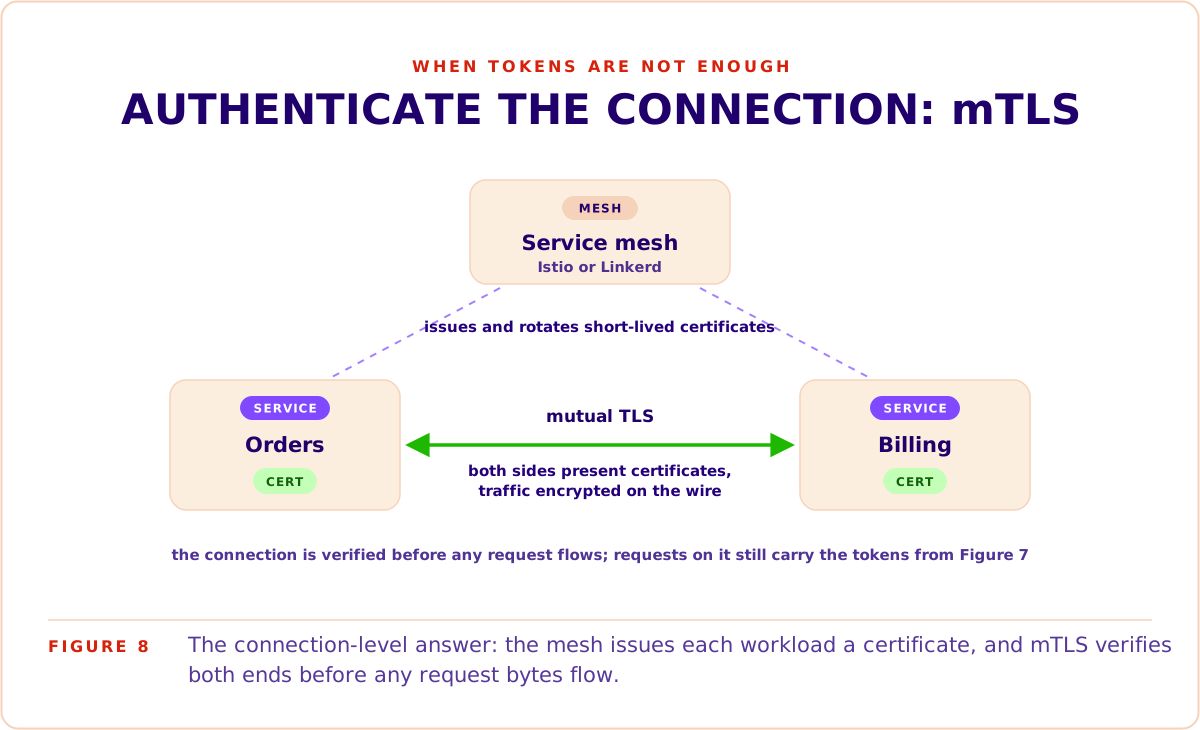
You don't need it to start, and many systems never do. It becomes worth it when:
- Several teams deploy into one shared cluster, and you can't vouch for everything running next to your services.
- Compliance asks how your services authenticate to each other.
- A zero-trust policy requires every connection to be authenticated.
AI agents are a new kind of caller
Until recently, your API had two kinds of callers: people using your apps, and other companies' servers through integrations you set up with them. Now your users' AI agents want to call it too. They arrive through your CLI, which bundles many calls into one task, or through a Model Context Protocol (MCP) server that offers your API as tools. More and more products treat that as a feature to ship, as Figure 10 shows.
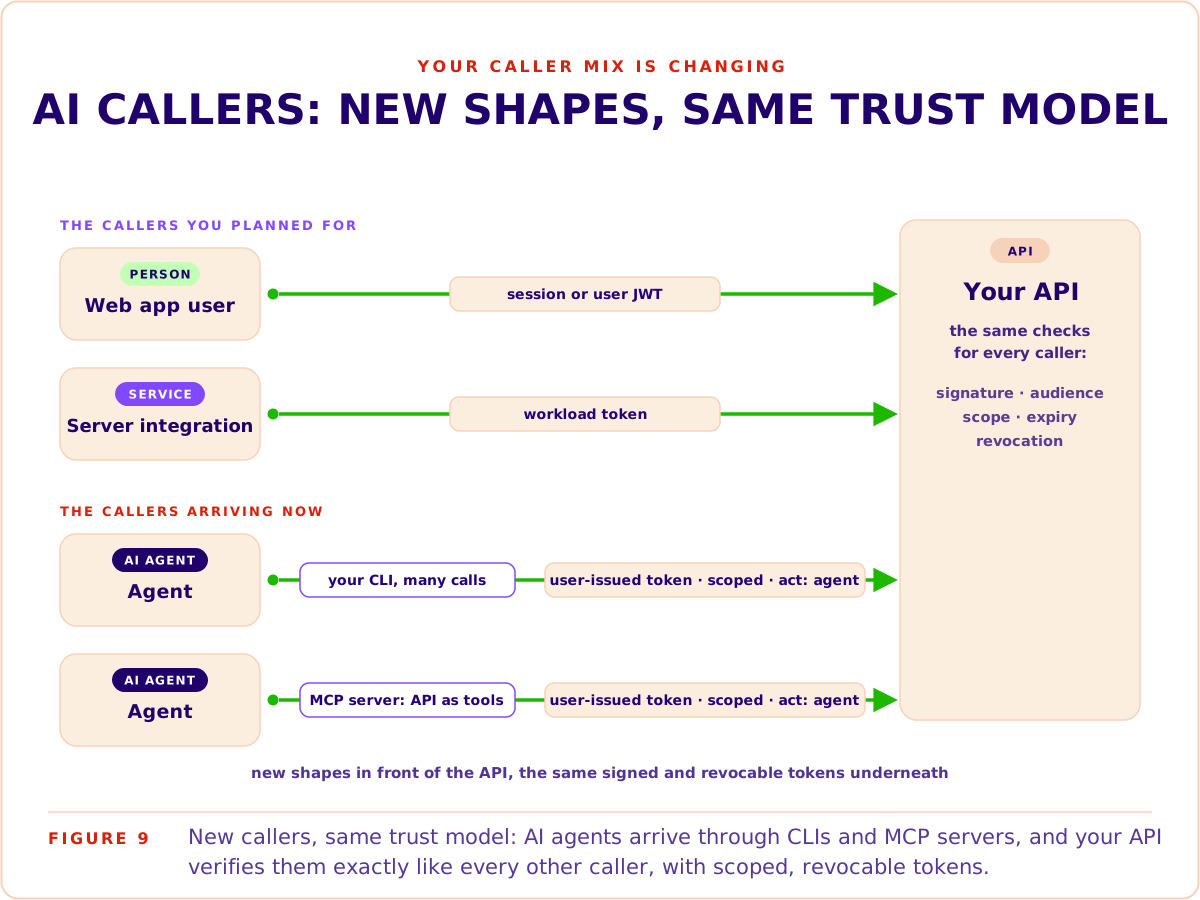
An agent is checked like any other machine caller, and it usually acts for a user. Give it its own short-lived token with only the scopes it needs. Put the user in sub and the agent in the act claim, the same way token exchange does, never in a prompt.
Three things get harder as agents arrive:
- More machine callers than people. Every agent and automation is another caller with its own token.
- Users will want to issue tokens themselves, limited to what their agent needs, so API tokens become part of your product.
- Revocation has to be quick. A misbehaving agent can make thousands of calls before its token expires, so you need a way to cut it off straight away.
Best practices for secure microservices authentication
The building blocks combine in many ways. These practices keep the combination secure as your system grows.
Check tokens in every service, and at the gateway too
For a new system, make the check in each service your baseline. It costs a library and a cached key set.
If you run a gateway, let it turn away bad tokens as well. It is a few lines of configuration and keeps junk traffic away from your services. A gateway helps most when you have:
- Many services, and want one place for rate limits, coarse access rules and audit logs.
- Services in several languages, and want one check that is configuration rather than code.
- Older services that can't check tokens themselves.
Put token checking in one shared library
The settings drift and clock problems above go away when every service uses the same check. Write it once per language, as a small shared library, and have every service use it. It should:
- Allow only the algorithms you use, such as RS256, so nobody can slip in a token signed another way.
- Check the issuer, audience and expiry of every token.
- Cache the JWKS keys and fetch them again when a token uses a key it doesn't know, so key rotation just works.
- Allow a few seconds of clock difference.
Keep tokens out of the browser
Say your web app is a single-page app that keeps the user's token in localStorage so it can call your API. Any script on the page can read it, so one compromised npm package or injected analytics script can copy the token out. From then on the attacker is that user, from any machine, until the token expires, and every request they make looks valid to your services.
The backend-for-frontend (BFF) pattern takes the token out of the browser. A small backend that belongs to the web app holds the tokens and makes the calls to your services. The browser gets an httpOnly session cookie, which scripts can't read.
An injected script can still act through the open page, but it can no longer carry a token off to use elsewhere, so keep your usual defences against cross-site scripting (XSS). Cookies also bring back cross-site request forgery (CSRF), where another site makes the browser send requests with the user's cookie, so protect the BFF with SameSite cookies and a CSRF token.
Mobile apps don't need a BFF for this reason, but they should keep tokens in the platform's secure storage: the iOS Keychain or the Android Keystore.
Keep access tokens short-lived
A short lifetime, minutes rather than hours, limits how long a stolen token works. The app renews it with a refresh token. Rotate the refresh token on every use and watch for reuse: if the same refresh token comes back twice, one of the two callers is an attacker, so end the whole session. Allow for a retry that arrives within a second or two, or a flaky network will log users out.
Let only the identity service touch passwords
Only the identity service should ever see a password or its hash. Hash passwords with a slow, salted algorithm built for the job, such as argon2id or bcrypt. Never encrypt them: whoever holds the key can decrypt every one.
Black belt: revoke access immediately
A token stays valid until it expires, which is a problem when you need to lock someone out now: a fired employee, a stolen laptop, a misbehaving agent. Three ways to close that gap, from simplest to strongest:
- Short token lifetimes cap how long access survives, as above.
- A revocation list that the identity service pushes to your services when it revokes an account or a token.
- Token introspection for your most sensitive endpoints: ask the identity service whether a token is still active, and accept the extra call.
User management across microservices: orgs, tenants, and identity propagation
Tokens carry who the user is, but services often need more than that. Billing prints the user's name and email address on invoices. A Notifications service keeps delivery preferences. Support tools search users by name. None of it fits in a token, so sooner or later a team asks whether their service should keep its own copy of the users table.
Say two teams do. A month later the copies disagree. A user changes their name and the invoices still show the old one. A deactivated employee still gets notifications. A deletion request comes in and nobody knows how many databases hold that person. Every service still works, which is why this drift goes unnoticed for so long.
The rule that prevents it is ownership:
- The identity service owns the user record, and the organisations and memberships with it: who belongs to which organisation, and with which role.
- Other services store only the user's id, as a reference to the identity service.
- A service that needs user data close at hand keeps a read-only copy that it never edits, and updates it from the identity service.
On each request, the context a service needs travels in the token: the user, the organisation and the role, like the claims in Figure 2. The identity service signs them, so a service can trust them without a database lookup.
Keep that context in the signed token rather than a plain header such as X-User-Id set by the gateway: anyone who can reach a service directly can set a header. The OWASP Microservices Security Cheat Sheet makes the same recommendation.
The catch is that a token is a snapshot. A token issued at 9:00 still says Ana is an admin at 9:30, even if her role changed at 9:15. Short lifetimes limit how long old claims live. For changes that can't wait, have the identity service send an event when a user, organisation or membership changes. Services with read-only copies update them, and the app can renew the user's token straight away.
For B2B products, the organisation side deserves a guide of its own: multi-tenant authentication covers tenancy models and how to keep tenants apart.
When you don't need all of this
If your product is one application with one backend, you don't need the full setup. A gateway, key distribution and a service mesh take time to build and need care afterwards.
That doesn't make a hand-built session login the right choice either. Every request needs a lookup in a shared session store, and every server needs access to it, which gets harder to run as traffic and servers grow. And product needs tend to arrive before scale does: users want to sign in with Google or with passkeys, enterprise customers want to connect their own identity platform, and servers and AI agents need credentials a session cookie can't represent. That pressure hits a monolith just as hard as microservices.
So build on the same principles from day one, while they are cheap:
- Keep authentication in one module, and don't let the rest of the app touch credentials.
- Refer to users by id everywhere, never by a copied profile.
- Take sign-in from a library or platform that already speaks tokens and several login methods, instead of adding login methods one by one.
- Issue tokens for your API if a mobile app or a public API is likely. Sessions for the browser and tokens for machines work fine side by side.
None of this takes much longer when a library or platform does the heavy lifting, and it makes a later move to microservices much easier. When you do move later, most of the work is moving user data that has spread into other tables back to one place.
Add the building blocks as you need them:
- A second backend service needs to know who the user is: move sign-in into an identity service, and check tokens in each service.
- You run many services, or several languages: let a gateway turn away bad tokens at the edge.
- Services call each other on sensitive paths: add workload tokens, then token exchange, and mTLS when the risk justifies it.


